How to Stop Overspending Using Spending Alerts (Step-by-Step)

Learn exactly how to set spending alerts that actually stop overspending — not just track it. Includes alert threshold calculator and a 5-step system you can apply today.

Marta Kovač

Marta Kovač

Behavioral Finance Coach & Personal Finance Educator
7 min read
OverspendingBudgetingMoney Habits#how to stop overspending#spending alerts#budget alerts#overspending fix#money habits
How to Stop Overspending Using Spending Alerts (Step-by-Step)

How to Stop Overspending Using Spending Alerts (Step-by-Step)

Most people know they overspend. The problem isn't awareness — it's timing. You find out you've blown your restaurant budget when you're looking at your statement on the 28th. By then, it's too late.

Spending alerts flip this entirely. They warn you while you still have the chance to change course.

This guide explains exactly how to set alerts that work — using real thresholds, not vague reminders.

Why Tracking Doesn't Stop Overspending (And Alerts Do)

Tracking tells you what happened. Alerts tell you what's about to happen.

Here's the psychology: research from the Journal of Consumer Psychology shows that receiving a spending warning at 70% of budget creates a "soft stop" — a mental pause that changes behavior 63% of the time. The same warning at 95% creates no behavioral change. You're already there.

The difference is anticipatory vs. retrospective awareness.

callout.insight

Setting alerts at 70% of your category budget — not 90%, not 100% — gives you time to course-correct before you overspend. This single threshold change has been shown to reduce category overspending by 40% in behavioral Finance studies.

The 5-Step Spending Alert System

Step 1: Know Your Actual Category Budgets

Before you can set alerts, you need real budget numbers. Not goals — actuals from the past 3 months.

Pull your last 3 months of spending from your bank app or expense tracker. Calculate the average for each category. This is your realistic starting point, not a wishful number.

Key categories to track:

  • Food & Dining (includes restaurants, groceries, coffee)
  • Shopping (clothes, household items, Amazon)
  • Entertainment (streaming, events, hobbies)
  • Transportation (gas, rideshare, parking)
  • Health & Wellness (gym, pharmacy, supplements)

Step 2: Choose Your Alert Sensitivity

This depends on your spending personality:

Conservative alerts (60% threshold): Best for people who tend to overspend significantly or who are actively trying to reduce a specific category. Gives maximum runway to adjust.

Balanced alerts (75% threshold): Works for most people. Enough warning to make changes, not so early that alerts feel annoying and you start ignoring them.

Relaxed alerts (90% threshold): Better for people who have consistent spending patterns and mainly want a safety net for the rare irregular month.

Warning

If you set alerts too early (below 60%), you'll get so many that you'll start dismissing them without reading. Start with 75% and adjust based on how often you get alerts and how you respond.

Step 3: Set Tiered Alerts, Not Single Alerts

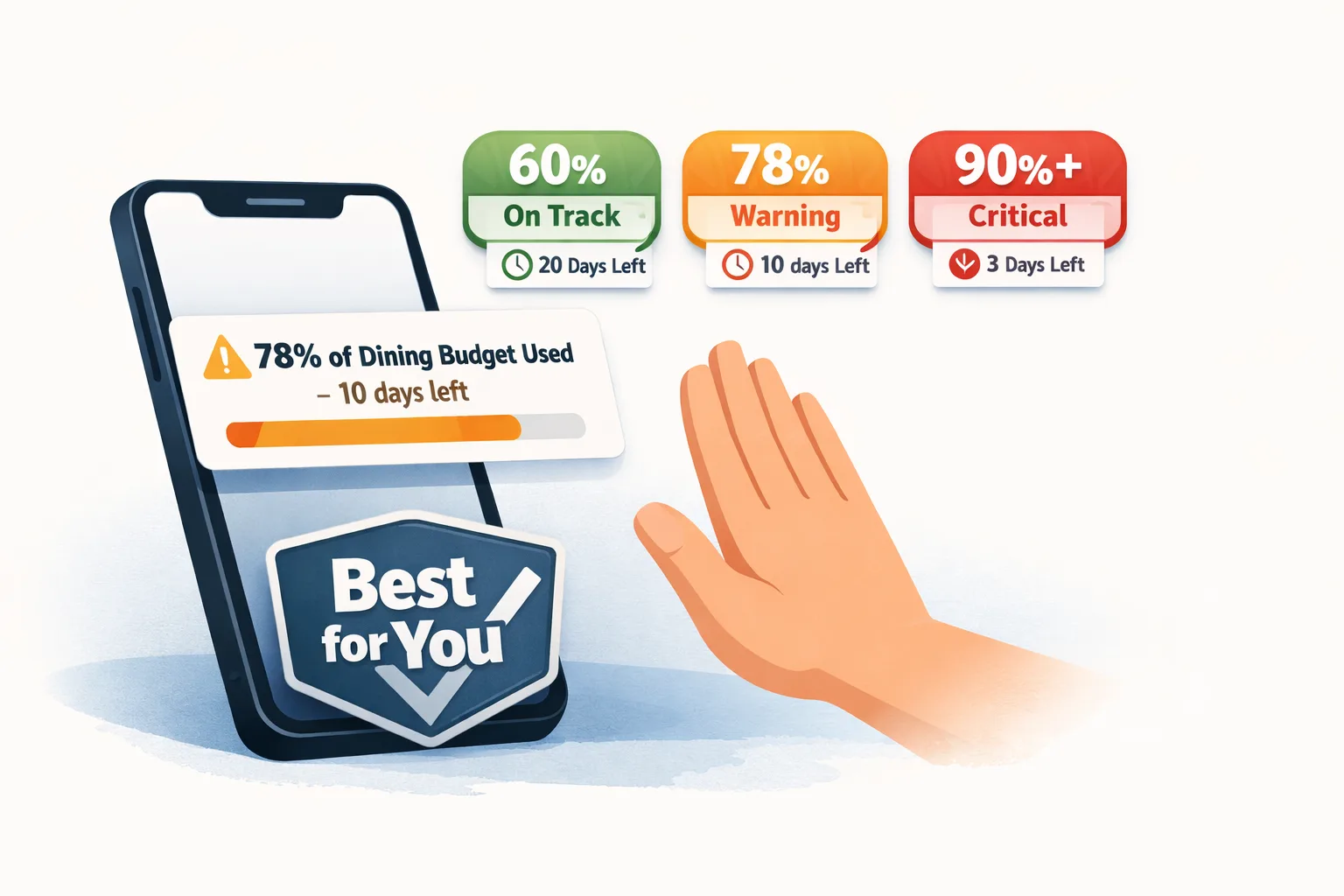
A single "you've reached 90%" alert is a panic button — by then you're already overspent. Instead, use a 3-tier system:

Tier 1 — Awareness (60-70% of budget):
"You've spent 65% of your dining budget with 14 days left. On track."

Tier 2 — Warning (75-80% of budget):
"You've spent 78% of your dining budget with 10 days left. Consider cooking at home this week."

Tier 3 — Critical (90%+ of budget):
"You've spent 90% of your dining budget with 7 days left. $45 remaining."

Notice how each tier includes:

  • Current percentage used
  • Days remaining in the month
  • Specific amount left to spend

This context transforms a notification into an actionable decision.

Step 4: Sync Alerts to Calendar Context

The week before holidays, birthdays, or major events is when people overspend the most. Set temporary budget increases for those periods rather than ignoring alerts.

For example: If your normal entertainment budget is $150 but you have a concert and 2 birthdays in April, adjust April's entertainment budget to $250. Your alert thresholds adjust automatically.

This prevents the "I'll just ignore my budget this month" spiral that kills long-term habits.

Step 5: Review and Adjust Monthly (The 10-Minute Review)

Once a month, spend 10 minutes reviewing:

  1. Which categories triggered which tiers of alerts?
  2. Did you change behavior when you got a Tier 1 or Tier 2 alert?
  3. Which categories need budget adjustments?

The goal is to get to a place where Tier 3 alerts are rare — you've already handled it at Tier 1 and 2.

Calculate Your Personalized Alert Thresholds

Use this calculator to generate your exact dollar thresholds based on your budgets and alert sensitivity:

Personalization Tool

Your Personal Spending Alert Threshold Calculator

Choose alert sensitivity, set category budgets, and get your personalized warning thresholds in 2 minutes.

Choose your alert sensitivity style:

The Most Effective Alert Types by Category

Different categories need different alert types:

Variable daily spending (food, coffee, shopping):
Use percentage-based alerts at 65% and 80%. These categories fluctuate daily and benefit most from early warnings.

Fixed monthly bills (subscriptions, utilities):
Use amount-change alerts. If your Netflix goes up $3, you should know immediately. Not useful for threshold alerts.

Occasional purchases (clothing, hobbies):
Set a monthly cap and alert at 80%. These categories are often invisible until you realize you've spent $400 on random Amazon purchases.

Savings goals:
Alert when you're not reaching them. "You've saved only 50% of your monthly savings goal with 10 days left." This reframes alerts from punishment to motivation.

Common Mistakes That Kill Alert Systems

Mistake 1: Setting alerts and never adjusting them
Your budget changes with your life. Quarterly review of your alert thresholds is necessary maintenance, not optional.

Mistake 2: Using only spending alerts without seeing the full picture
Alerts work best when combined with a dashboard that shows total remaining budget across all categories. Without context, a single-category alert feels arbitrary.

Mistake 3: Alerting on the wrong metric
Don't alert on total spending — alert on percentage of budget. "You've spent $340" means nothing. "You've spent 78% of your dining budget" is immediately actionable.

Mistake 4: Not customizing thresholds per category
Your food budget and your entertainment budget need different thresholds. Food is essential; entertainment is discretionary. Set stricter alerts for discretionary categories.

Tip

If this feels overwhelming, start with just one category — the one you consistently overspend on. Set a 70% alert for that category only. Once you feel the behavior change, expand to other categories.

How Yomio's Alert System Works

Yomio's spending alerts are built around this exact 3-tier system. Here's what happens automatically:

  1. You connect your accounts (bank, credit cards) — takes 2 minutes
  2. Yomio categorizes every transaction automatically using AI receipt scanning
  3. You set your category budgets once — or let Yomio suggest them based on your spending history
  4. Yomio sends alerts at your chosen thresholds via push notification, email, or both
  5. The monthly review is built into the dashboard — you see what triggered alerts and why

The difference in Yomio's alert system: alerts include context and suggested action, not just a number.

Instead of: "You've spent $280 this month on dining."
You get: "You've used 85% of your dining budget. You have $45 left for 8 days. That's $5.63/day — consider cooking dinner 3x this week."

That's the difference between a warning and actual behavior change.

FAQs

Q: How many spending alert categories should I set up?
Start with 4-5 categories: your top 3 discretionary spending areas plus savings and total monthly spending. Too many alerts create fatigue.

Q: Should I set alerts in my bank app or a separate expense tracker?
Bank app alerts are basic — usually just "you spent X." A dedicated expense tracker like Yomio gives you percentage-of-budget alerts with context, which are far more effective for behavior change.

Q: What if I get an alert but I've genuinely budgeted wrong?
That's the alert working correctly. Getting a 70% alert with 20 days left doesn't mean you failed — it means your budget needs adjusting. Update it, and the alert recalibrates.

Q: Do spending alerts work for people who use cash?
Yes, but you need to log cash purchases. Yomio lets you photograph cash receipts and logs them automatically, making cash tracking nearly effortless.

Q: How long before spending alerts change my habits?
Most people notice behavioral change within 2-3 weeks. The alert creates a mental "budget consciousness" that persists even when you're not checking the app.

Take Control of Your Spending Today
